## 🔥 Updates
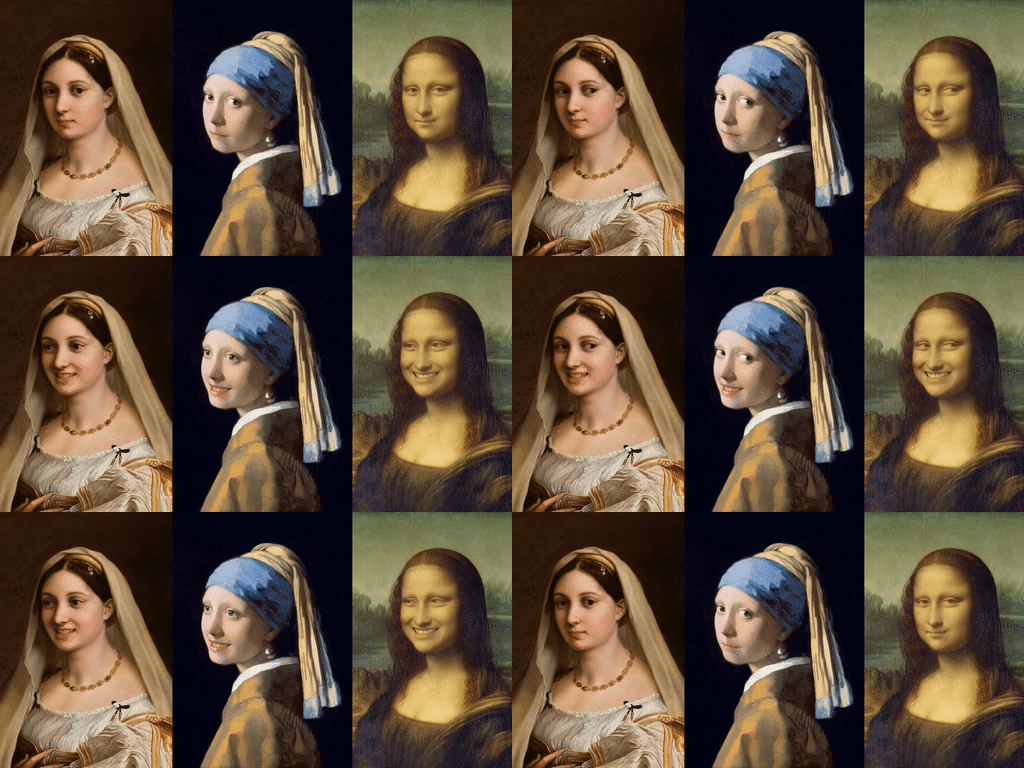
- **`2025/06/01`**: 🌍 Over the past year, **LivePortrait** has 🚀 become an efficient portrait-animation (humans, cats and dogs) solution adopted by major video platforms—Kuaishou, Douyin, Jianying, WeChat Channels—as well as numerous startups and creators. 🎉
- **`2025/01/01`**: 🐶 We updated a new version of the Animals model with more data, see [**here**](./assets/docs/changelog/2025-01-01.md).
- **`2024/10/18`**: ❗ We have updated the versions of the `transformers` and `gradio` libraries to avoid security vulnerabilities. Details [here](https://github.com/KlingTeam/LivePortrait/pull/421/files).
- **`2024/08/29`**: 📦 We update the Windows [one-click installer](https://huggingface.co/cleardusk/LivePortrait-Windows/blob/main/LivePortrait-Windows-v20240829.zip) and support auto-updates, see [changelog](https://huggingface.co/cleardusk/LivePortrait-Windows#20240829).
- **`2024/08/19`**: 🖼️ We support **image driven mode** and **regional control**. For details, see [**here**](./assets/docs/changelog/2024-08-19.md).
- **`2024/08/06`**: 🎨 We support **precise portrait editing** in the Gradio interface, inspired by [ComfyUI-AdvancedLivePortrait](https://github.com/PowerHouseMan/ComfyUI-AdvancedLivePortrait). See [**here**](./assets/docs/changelog/2024-08-06.md).
- **`2024/08/05`**: 📦 Windows users can now download the [one-click installer](https://huggingface.co/cleardusk/LivePortrait-Windows/blob/main/LivePortrait-Windows-v20240806.zip) for Humans mode and **Animals mode** now! For details, see [**here**](./assets/docs/changelog/2024-08-05.md).
- **`2024/08/02`**: 😸 We released a version of the **Animals model**, along with several other updates and improvements. Check out the details [**here**](./assets/docs/changelog/2024-08-02.md)!
- **`2024/07/25`**: 📦 Windows users can now download the package from [HuggingFace](https://huggingface.co/cleardusk/LivePortrait-Windows/tree/main). Simply unzip and double-click `run_windows.bat` to enjoy!
- **`2024/07/24`**: 🎨 We support pose editing for source portraits in the Gradio interface. We’ve also lowered the default detection threshold to increase recall. [Have fun](assets/docs/changelog/2024-07-24.md)!
- **`2024/07/19`**: ✨ We support 🎞️ **portrait video editing (aka v2v)**! More to see [here](assets/docs/changelog/2024-07-19.md).
- **`2024/07/17`**: 🍎 We support macOS with Apple Silicon, modified from [jeethu](https://github.com/jeethu)'s PR [#143](https://github.com/KlingTeam/LivePortrait/pull/143).
- **`2024/07/10`**: 💪 We support audio and video concatenating, driving video auto-cropping, and template making to protect privacy. More to see [here](assets/docs/changelog/2024-07-10.md).
- **`2024/07/09`**: 🤗 We released the [HuggingFace Space](https://huggingface.co/spaces/KlingTeam/LivePortrait), thanks to the HF team and [Gradio](https://github.com/gradio-app/gradio)!
- **`2024/07/04`**: 😊 We released the initial version of the inference code and models. Continuous updates, stay tuned!
- **`2024/07/04`**: 🔥 We released the [homepage](https://liveportrait.github.io) and technical report on [arXiv](https://arxiv.org/pdf/2407.03168).
## Introduction 📖
This repo, named **LivePortrait**, contains the official PyTorch implementation of our paper [LivePortrait: Efficient Portrait Animation with Stitching and Retargeting Control](https://arxiv.org/pdf/2407.03168).
We are actively updating and improving this repository. If you find any bugs or have suggestions, welcome to raise issues or submit pull requests (PR) 💖.
## Getting Started 🏁
### 1. Clone the code and prepare the environment 🛠️
> [!Note]
> Make sure your system has [`git`](https://git-scm.com/), [`conda`](https://anaconda.org/anaconda/conda), and [`FFmpeg`](https://ffmpeg.org/download.html) installed. For details on FFmpeg installation, see [**how to install FFmpeg**](assets/docs/how-to-install-ffmpeg.md).
```bash
git clone https://github.com/KlingTeam/LivePortrait
cd LivePortrait
# create env using conda
conda create -n LivePortrait python=3.10
conda activate LivePortrait
```
#### For Linux 🐧 or Windows 🪟 Users
[X-Pose](https://github.com/IDEA-Research/X-Pose), required by Animals mode, is a dependency that needs to be installed. The step of `Check your CUDA versions` is **optional** if you only want to run Humans mode.
Check your CUDA versions
Firstly, check your current CUDA version by:
```bash
nvcc -V # example versions: 11.1, 11.8, 12.1, etc.
```
Then, install the corresponding torch version. Here are examples for different CUDA versions. Visit the [PyTorch Official Website](https://pytorch.org/get-started/previous-versions) for installation commands if your CUDA version is not listed:
```bash
# for CUDA 11.1
pip install torch==1.10.1+cu111 torchvision==0.11.2 torchaudio==0.10.1 -f https://download.pytorch.org/whl/cu111/torch_stable.html
# for CUDA 11.8
pip install torch==2.3.0 torchvision==0.18.0 torchaudio==2.3.0 --index-url https://download.pytorch.org/whl/cu118
# for CUDA 12.1
pip install torch==2.3.0 torchvision==0.18.0 torchaudio==2.3.0 --index-url https://download.pytorch.org/whl/cu121
# ...
```
**Note**: On Windows systems, some higher versions of CUDA (such as 12.4, 12.6, etc.) may lead to unknown issues. You may consider downgrading CUDA to version 11.8 for stability. See the [downgrade guide](https://github.com/dimitribarbot/sd-webui-live-portrait/blob/main/assets/docs/how-to-install-xpose.md#cuda-toolkit-118) by [@dimitribarbot](https://github.com/dimitribarbot).
Finally, install the remaining dependencies:
```bash
pip install -r requirements.txt
```
#### For macOS with Apple Silicon Users
The [X-Pose](https://github.com/IDEA-Research/X-Pose) dependency does not support macOS, so you can skip its installation. While Humans mode works as usual, Animals mode is not supported. Use the provided requirements file for macOS with Apple Silicon:
```bash
# for macOS with Apple Silicon users
pip install -r requirements_macOS.txt
```
### 2. Download pretrained weights 📥
The easiest way to download the pretrained weights is from HuggingFace:
```bash
# !pip install -U "huggingface_hub[cli]"
huggingface-cli download KlingTeam/LivePortrait --local-dir pretrained_weights --exclude "*.git*" "README.md" "docs"
```
If you cannot access to Huggingface, you can use [hf-mirror](https://hf-mirror.com/) to download:
```bash
# !pip install -U "huggingface_hub[cli]"
export HF_ENDPOINT=https://hf-mirror.com
huggingface-cli download KlingTeam/LivePortrait --local-dir pretrained_weights --exclude "*.git*" "README.md" "docs"
```
Alternatively, you can download all pretrained weights from [Google Drive](https://drive.google.com/drive/folders/1UtKgzKjFAOmZkhNK-OYT0caJ_w2XAnib) or [Baidu Yun](https://pan.baidu.com/s/1MGctWmNla_vZxDbEp2Dtzw?pwd=z5cn). Unzip and place them in `./pretrained_weights`.
Ensuring the directory structure is as or contains [**this**](assets/docs/directory-structure.md).
### 3. Inference 🚀
#### Fast hands-on (humans) 👤
```bash
# For Linux and Windows users
python inference.py
# For macOS users with Apple Silicon (Intel is not tested). NOTE: this maybe 20x slower than RTX 4090
PYTORCH_ENABLE_MPS_FALLBACK=1 python inference.py
```
If the script runs successfully, you will get an output mp4 file named `animations/s6--d0_concat.mp4`. This file includes the following results: driving video, input image or video, and generated result.
Or, you can change the input by specifying the `-s` and `-d` arguments:
```bash
# source input is an image
python inference.py -s assets/examples/source/s9.jpg -d assets/examples/driving/d0.mp4
# source input is a video ✨
python inference.py -s assets/examples/source/s13.mp4 -d assets/examples/driving/d0.mp4
# more options to see
python inference.py -h
```
#### Fast hands-on (animals) 🐱🐶
Animals mode is ONLY tested on Linux and Windows with NVIDIA GPU.
You need to build an OP named `MultiScaleDeformableAttention` first (refer to the Check your CUDA versions if needed), which is used by [X-Pose](https://github.com/IDEA-Research/X-Pose), a general keypoint detection framework.
```bash
cd src/utils/dependencies/XPose/models/UniPose/ops
python setup.py build install
cd - # equal to cd ../../../../../../../
```
Then
```bash
python inference_animals.py -s assets/examples/source/s39.jpg -d assets/examples/driving/wink.pkl --driving_multiplier 1.75 --no_flag_stitching
```
If the script runs successfully, you will get an output mp4 file named `animations/s39--wink_concat.mp4`.
#### Driving video auto-cropping 📢📢📢
> [!IMPORTANT]
> To use your own driving video, we **recommend**: ⬇️
> - Crop it to a **1:1** aspect ratio (e.g., 512x512 or 256x256 pixels), or enable auto-cropping by `--flag_crop_driving_video`.
> - Focus on the head area, similar to the example videos.
> - Minimize shoulder movement.
> - Make sure the first frame of driving video is a frontal face with **neutral expression**.
Below is an auto-cropping case by `--flag_crop_driving_video`:
```bash
python inference.py -s assets/examples/source/s9.jpg -d assets/examples/driving/d13.mp4 --flag_crop_driving_video
```
If you find the results of auto-cropping is not well, you can modify the `--scale_crop_driving_video`, `--vy_ratio_crop_driving_video` options to adjust the scale and offset, or do it manually.
#### Motion template making
You can also use the auto-generated motion template files ending with `.pkl` to speed up inference, and **protect privacy**, such as:
```bash
python inference.py -s assets/examples/source/s9.jpg -d assets/examples/driving/d5.pkl # portrait animation
python inference.py -s assets/examples/source/s13.mp4 -d assets/examples/driving/d5.pkl # portrait video editing
```
### 4. Gradio interface 🤗
We also provide a Gradio interface for a better experience, just run by:
```bash
# For Linux and Windows users (and macOS with Intel??)
python app.py # humans mode
# For macOS with Apple Silicon users, Intel not supported, this maybe 20x slower than RTX 4090
PYTORCH_ENABLE_MPS_FALLBACK=1 python app.py # humans mode
```
We also provide a Gradio interface of animals mode, which is only tested on Linux with NVIDIA GPU:
```bash
python app_animals.py # animals mode 🐱🐶
```
You can specify the `--server_port`, `--share`, `--server_name` arguments to satisfy your needs!
🚀 We also provide an acceleration option `--flag_do_torch_compile`. The first-time inference triggers an optimization process (about one minute), making subsequent inferences 20-30% faster. Performance gains may vary with different CUDA versions.
```bash
# enable torch.compile for faster inference
python app.py --flag_do_torch_compile
```
**Note**: This method is not supported on Windows and macOS.
**Or, try it out effortlessly on [HuggingFace](https://huggingface.co/spaces/KlingTeam/LivePortrait) 🤗**
### 5. Inference speed evaluation 🚀🚀🚀
We have also provided a script to evaluate the inference speed of each module:
```bash
# For NVIDIA GPU
python speed.py
```
The results are [**here**](./assets/docs/speed.md).
## Community Resources 🤗
Discover the invaluable resources contributed by our community to enhance your LivePortrait experience.
### Community-developed Projects
| Repo | Description | Author / Links |
|------|------|--------|
| [**ditto-talkinghead**](https://github.com/antgroup/ditto-talkinghead) | Real-time audio-driven talking head. | [ArXiv](https://arxiv.org/abs/2411.19509), [Homepage](https://digital-avatar.github.io/ai/Ditto/) |
| [**FasterLivePortrait**](https://github.com/warmshao/FasterLivePortrait) | Faster real-time version using TensorRT. | [@warmshao](https://github.com/warmshao) |
| [**AdvancedLivePortrait-WebUI**](https://github.com/jhj0517/AdvancedLivePortrait-WebUI) | Dedicated gradio based WebUI started from [ComfyUI-AdvancedLivePortrait](https://github.com/PowerHouseMan/ComfyUI-AdvancedLivePortrait). | [@jhj0517](https://github.com/jhj0517) |
| [**FacePoke**](https://github.com/jbilcke-hf/FacePoke) | A real-time head transformation app, controlled by your mouse! | [@jbilcke-hf](https://github.com/jbilcke-hf) |
| [**FaceFusion**](https://github.com/facefusion/facefusion) | FaceFusion 3.0 integregates LivePortrait as `expression_restorer` and `face_editor` processors. | [@henryruhs](https://github.com/henryruhs) |
| [**sd-webui-live-portrait**](https://github.com/dimitribarbot/sd-webui-live-portrait) | WebUI extension of LivePortrait, adding atab to the original Stable Diffusion WebUI to benefit from LivePortrait features. | [@dimitribarbot](https://github.com/dimitribarbot) |
| [**ComfyUI-LivePortraitKJ**](https://github.com/kijai/ComfyUI-LivePortraitKJ) | A ComfyUI node to use LivePortrait, with MediaPipe as as an alternative to Insightface. | [@kijai](https://github.com/kijai) |
| [**ComfyUI-AdvancedLivePortrait**](https://github.com/PowerHouseMan/ComfyUI-AdvancedLivePortrait) | A faster ComfyUI node with real-time preview that has inspired many other community-developed tools and projects. | [@PowerHouseMan](https://github.com/PowerHouseMan) |
| [**comfyui-liveportrait**](https://github.com/shadowcz007/comfyui-liveportrait) | A ComfyUI node to use LivePortrait, supporting multi-faces, expression interpolation etc, with a [tutorial](https://www.bilibili.com/video/BV1JW421R7sP). | [@shadowcz007](https://github.com/shadowcz007) |
### Playgrounds, 🤗 HuggingFace Spaces and Others
- [FacePoke Space](https://huggingface.co/spaces/jbilcke-hf/FacePoke)
- [Expression Editor Space](https://huggingface.co/spaces/fffiloni/expression-editor)
- [Expression Editor Replicate](https://replicate.com/fofr/expression-editor)
- [Face Control Realtime Demo](https://fal.ai/demos/face-control) on FAL
- [Replicate Playground](https://replicate.com/fofr/live-portrait)
- Nuke can use LivePortrait through CompyUI node, details [here](https://x.com/bilawalsidhu/status/1837349806475276338)
- LivePortrait lives on [Poe](https://poe.com/LivePortrait)
### Video Tutorials
- [Workflow of LivePortrait Video to Video](https://youtu.be/xfzK_6cTs58?si=aYjgypeJBkhc46VL) by [@curiousrefuge](https://www.youtube.com/@curiousrefuge)
- [Google Colab tutorial](https://youtu.be/59Y9ePAXTp0?si=KzEWhklBlporW7D8) by [@Planet Ai](https://www.youtube.com/@planetai217)
- [Paper reading](https://youtu.be/fD0P6UWSu8I?si=Vn5wxUa8qSu1jv4l) by [@TwoMinutePapers](https://www.youtube.com/@TwoMinutePapers)
- [ComfyUI Advanced LivePortrait](https://youtu.be/q0Vf-ZZsbzI?si=nbs3npleH-dVCt28) by [TutoView](https://www.youtube.com/@TutoView)
- [LivePortarit exploration](https://www.youtube.com/watch?v=vsvlbTEqgXQ) and [A deep dive into LivePortrait](https://youtu.be/cucaEEDYmsw?si=AtPaDWc5G-a4E8dD) by [TheoreticallyMedia](https://www.youtube.com/@TheoreticallyMedia)
- [LivePortrait hands-on tutorial](https://www.youtube.com/watch?v=uyjSTAOY7yI) by [@AI Search](https://www.youtube.com/@theAIsearch)
- [ComfyUI tutorial](https://www.youtube.com/watch?v=8-IcDDmiUMM) by [@Sebastian Kamph](https://www.youtube.com/@sebastiankamph)
- A [tutorial](https://www.bilibili.com/video/BV1cf421i7Ly) on BiliBili
And so MANY amazing contributions from our community, too many to list them all 💖
## Acknowledgements 💐
We would like to thank the contributors of [FOMM](https://github.com/AliaksandrSiarohin/first-order-model), [Open Facevid2vid](https://github.com/zhanglonghao1992/One-Shot_Free-View_Neural_Talking_Head_Synthesis), [SPADE](https://github.com/NVlabs/SPADE), [InsightFace](https://github.com/deepinsight/insightface) and [X-Pose](https://github.com/IDEA-Research/X-Pose) repositories, for their open research and contributions.
## Ethics Considerations 🛡️
Portrait animation technologies come with social risks, particularly the potential for misuse in creating deepfakes. To mitigate these risks, it’s crucial to follow ethical guidelines and adopt responsible usage practices. At present, the synthesized results contain visual artifacts that may help in detecting deepfakes. Please note that we do not assume any legal responsibility for the use of the results generated by this project.
## Citation 💖
If you find LivePortrait useful for your project or research, welcome to 🌟 this repo and cite our work using the following BibTeX:
```bibtex
@article{guo2024liveportrait,
title = {LivePortrait: Efficient Portrait Animation with Stitching and Retargeting Control},
author = {Guo, Jianzhu and Zhang, Dingyun and Liu, Xiaoqiang and Zhong, Zhizhou and Zhang, Yuan and Wan, Pengfei and Zhang, Di},
journal = {arXiv preprint arXiv:2407.03168},
year = {2024}
}
```
*Long live in arXiv.*
## Contact 📧
[**Jianzhu Guo (郭建珠)**](https://guojianzhu.com); **guojianzhu1994@gmail.com**
## Star History 🌟
Click to view Star chart









 interface for a better experience, just run by:
```bash
# For Linux and Windows users (and macOS with Intel??)
python app.py # humans mode
# For macOS with Apple Silicon users, Intel not supported, this maybe 20x slower than RTX 4090
PYTORCH_ENABLE_MPS_FALLBACK=1 python app.py # humans mode
```
We also provide a Gradio interface of animals mode, which is only tested on Linux with NVIDIA GPU:
```bash
python app_animals.py # animals mode 🐱🐶
```
You can specify the `--server_port`, `--share`, `--server_name` arguments to satisfy your needs!
🚀 We also provide an acceleration option `--flag_do_torch_compile`. The first-time inference triggers an optimization process (about one minute), making subsequent inferences 20-30% faster. Performance gains may vary with different CUDA versions.
```bash
# enable torch.compile for faster inference
python app.py --flag_do_torch_compile
```
**Note**: This method is not supported on Windows and macOS.
**Or, try it out effortlessly on [HuggingFace](https://huggingface.co/spaces/KlingTeam/LivePortrait) 🤗**
### 5. Inference speed evaluation 🚀🚀🚀
We have also provided a script to evaluate the inference speed of each module:
```bash
# For NVIDIA GPU
python speed.py
```
The results are [**here**](./assets/docs/speed.md).
## Community Resources 🤗
Discover the invaluable resources contributed by our community to enhance your LivePortrait experience.
### Community-developed Projects
| Repo | Description | Author / Links |
|------|------|--------|
| [**ditto-talkinghead**](https://github.com/antgroup/ditto-talkinghead) | Real-time audio-driven talking head. | [ArXiv](https://arxiv.org/abs/2411.19509), [Homepage](https://digital-avatar.github.io/ai/Ditto/) |
| [**FasterLivePortrait**](https://github.com/warmshao/FasterLivePortrait) | Faster real-time version using TensorRT. | [@warmshao](https://github.com/warmshao) |
| [**AdvancedLivePortrait-WebUI**](https://github.com/jhj0517/AdvancedLivePortrait-WebUI) | Dedicated gradio based WebUI started from [ComfyUI-AdvancedLivePortrait](https://github.com/PowerHouseMan/ComfyUI-AdvancedLivePortrait). | [@jhj0517](https://github.com/jhj0517) |
| [**FacePoke**](https://github.com/jbilcke-hf/FacePoke) | A real-time head transformation app, controlled by your mouse! | [@jbilcke-hf](https://github.com/jbilcke-hf) |
| [**FaceFusion**](https://github.com/facefusion/facefusion) | FaceFusion 3.0 integregates LivePortrait as `expression_restorer` and `face_editor` processors. | [@henryruhs](https://github.com/henryruhs) |
| [**sd-webui-live-portrait**](https://github.com/dimitribarbot/sd-webui-live-portrait) | WebUI extension of LivePortrait, adding atab to the original Stable Diffusion WebUI to benefit from LivePortrait features. | [@dimitribarbot](https://github.com/dimitribarbot) |
| [**ComfyUI-LivePortraitKJ**](https://github.com/kijai/ComfyUI-LivePortraitKJ) | A ComfyUI node to use LivePortrait, with MediaPipe as as an alternative to Insightface. | [@kijai](https://github.com/kijai) |
| [**ComfyUI-AdvancedLivePortrait**](https://github.com/PowerHouseMan/ComfyUI-AdvancedLivePortrait) | A faster ComfyUI node with real-time preview that has inspired many other community-developed tools and projects. | [@PowerHouseMan](https://github.com/PowerHouseMan) |
| [**comfyui-liveportrait**](https://github.com/shadowcz007/comfyui-liveportrait) | A ComfyUI node to use LivePortrait, supporting multi-faces, expression interpolation etc, with a [tutorial](https://www.bilibili.com/video/BV1JW421R7sP). | [@shadowcz007](https://github.com/shadowcz007) |
### Playgrounds, 🤗 HuggingFace Spaces and Others
- [FacePoke Space](https://huggingface.co/spaces/jbilcke-hf/FacePoke)
- [Expression Editor Space](https://huggingface.co/spaces/fffiloni/expression-editor)
- [Expression Editor Replicate](https://replicate.com/fofr/expression-editor)
- [Face Control Realtime Demo](https://fal.ai/demos/face-control) on FAL
- [Replicate Playground](https://replicate.com/fofr/live-portrait)
- Nuke can use LivePortrait through CompyUI node, details [here](https://x.com/bilawalsidhu/status/1837349806475276338)
- LivePortrait lives on [Poe](https://poe.com/LivePortrait)
### Video Tutorials
- [Workflow of LivePortrait Video to Video](https://youtu.be/xfzK_6cTs58?si=aYjgypeJBkhc46VL) by [@curiousrefuge](https://www.youtube.com/@curiousrefuge)
- [Google Colab tutorial](https://youtu.be/59Y9ePAXTp0?si=KzEWhklBlporW7D8) by [@Planet Ai](https://www.youtube.com/@planetai217)
- [Paper reading](https://youtu.be/fD0P6UWSu8I?si=Vn5wxUa8qSu1jv4l) by [@TwoMinutePapers](https://www.youtube.com/@TwoMinutePapers)
- [ComfyUI Advanced LivePortrait](https://youtu.be/q0Vf-ZZsbzI?si=nbs3npleH-dVCt28) by [TutoView](https://www.youtube.com/@TutoView)
- [LivePortarit exploration](https://www.youtube.com/watch?v=vsvlbTEqgXQ) and [A deep dive into LivePortrait](https://youtu.be/cucaEEDYmsw?si=AtPaDWc5G-a4E8dD) by [TheoreticallyMedia](https://www.youtube.com/@TheoreticallyMedia)
- [LivePortrait hands-on tutorial](https://www.youtube.com/watch?v=uyjSTAOY7yI) by [@AI Search](https://www.youtube.com/@theAIsearch)
- [ComfyUI tutorial](https://www.youtube.com/watch?v=8-IcDDmiUMM) by [@Sebastian Kamph](https://www.youtube.com/@sebastiankamph)
- A [tutorial](https://www.bilibili.com/video/BV1cf421i7Ly) on BiliBili
And so MANY amazing contributions from our community, too many to list them all 💖
## Acknowledgements 💐
We would like to thank the contributors of [FOMM](https://github.com/AliaksandrSiarohin/first-order-model), [Open Facevid2vid](https://github.com/zhanglonghao1992/One-Shot_Free-View_Neural_Talking_Head_Synthesis), [SPADE](https://github.com/NVlabs/SPADE), [InsightFace](https://github.com/deepinsight/insightface) and [X-Pose](https://github.com/IDEA-Research/X-Pose) repositories, for their open research and contributions.
## Ethics Considerations 🛡️
Portrait animation technologies come with social risks, particularly the potential for misuse in creating deepfakes. To mitigate these risks, it’s crucial to follow ethical guidelines and adopt responsible usage practices. At present, the synthesized results contain visual artifacts that may help in detecting deepfakes. Please note that we do not assume any legal responsibility for the use of the results generated by this project.
## Citation 💖
If you find LivePortrait useful for your project or research, welcome to 🌟 this repo and cite our work using the following BibTeX:
```bibtex
@article{guo2024liveportrait,
title = {LivePortrait: Efficient Portrait Animation with Stitching and Retargeting Control},
author = {Guo, Jianzhu and Zhang, Dingyun and Liu, Xiaoqiang and Zhong, Zhizhou and Zhang, Yuan and Wan, Pengfei and Zhang, Di},
journal = {arXiv preprint arXiv:2407.03168},
year = {2024}
}
```
*Long live in arXiv.*
## Contact 📧
[**Jianzhu Guo (郭建珠)**](https://guojianzhu.com); **guojianzhu1994@gmail.com**
## Star History 🌟
interface for a better experience, just run by:
```bash
# For Linux and Windows users (and macOS with Intel??)
python app.py # humans mode
# For macOS with Apple Silicon users, Intel not supported, this maybe 20x slower than RTX 4090
PYTORCH_ENABLE_MPS_FALLBACK=1 python app.py # humans mode
```
We also provide a Gradio interface of animals mode, which is only tested on Linux with NVIDIA GPU:
```bash
python app_animals.py # animals mode 🐱🐶
```
You can specify the `--server_port`, `--share`, `--server_name` arguments to satisfy your needs!
🚀 We also provide an acceleration option `--flag_do_torch_compile`. The first-time inference triggers an optimization process (about one minute), making subsequent inferences 20-30% faster. Performance gains may vary with different CUDA versions.
```bash
# enable torch.compile for faster inference
python app.py --flag_do_torch_compile
```
**Note**: This method is not supported on Windows and macOS.
**Or, try it out effortlessly on [HuggingFace](https://huggingface.co/spaces/KlingTeam/LivePortrait) 🤗**
### 5. Inference speed evaluation 🚀🚀🚀
We have also provided a script to evaluate the inference speed of each module:
```bash
# For NVIDIA GPU
python speed.py
```
The results are [**here**](./assets/docs/speed.md).
## Community Resources 🤗
Discover the invaluable resources contributed by our community to enhance your LivePortrait experience.
### Community-developed Projects
| Repo | Description | Author / Links |
|------|------|--------|
| [**ditto-talkinghead**](https://github.com/antgroup/ditto-talkinghead) | Real-time audio-driven talking head. | [ArXiv](https://arxiv.org/abs/2411.19509), [Homepage](https://digital-avatar.github.io/ai/Ditto/) |
| [**FasterLivePortrait**](https://github.com/warmshao/FasterLivePortrait) | Faster real-time version using TensorRT. | [@warmshao](https://github.com/warmshao) |
| [**AdvancedLivePortrait-WebUI**](https://github.com/jhj0517/AdvancedLivePortrait-WebUI) | Dedicated gradio based WebUI started from [ComfyUI-AdvancedLivePortrait](https://github.com/PowerHouseMan/ComfyUI-AdvancedLivePortrait). | [@jhj0517](https://github.com/jhj0517) |
| [**FacePoke**](https://github.com/jbilcke-hf/FacePoke) | A real-time head transformation app, controlled by your mouse! | [@jbilcke-hf](https://github.com/jbilcke-hf) |
| [**FaceFusion**](https://github.com/facefusion/facefusion) | FaceFusion 3.0 integregates LivePortrait as `expression_restorer` and `face_editor` processors. | [@henryruhs](https://github.com/henryruhs) |
| [**sd-webui-live-portrait**](https://github.com/dimitribarbot/sd-webui-live-portrait) | WebUI extension of LivePortrait, adding atab to the original Stable Diffusion WebUI to benefit from LivePortrait features. | [@dimitribarbot](https://github.com/dimitribarbot) |
| [**ComfyUI-LivePortraitKJ**](https://github.com/kijai/ComfyUI-LivePortraitKJ) | A ComfyUI node to use LivePortrait, with MediaPipe as as an alternative to Insightface. | [@kijai](https://github.com/kijai) |
| [**ComfyUI-AdvancedLivePortrait**](https://github.com/PowerHouseMan/ComfyUI-AdvancedLivePortrait) | A faster ComfyUI node with real-time preview that has inspired many other community-developed tools and projects. | [@PowerHouseMan](https://github.com/PowerHouseMan) |
| [**comfyui-liveportrait**](https://github.com/shadowcz007/comfyui-liveportrait) | A ComfyUI node to use LivePortrait, supporting multi-faces, expression interpolation etc, with a [tutorial](https://www.bilibili.com/video/BV1JW421R7sP). | [@shadowcz007](https://github.com/shadowcz007) |
### Playgrounds, 🤗 HuggingFace Spaces and Others
- [FacePoke Space](https://huggingface.co/spaces/jbilcke-hf/FacePoke)
- [Expression Editor Space](https://huggingface.co/spaces/fffiloni/expression-editor)
- [Expression Editor Replicate](https://replicate.com/fofr/expression-editor)
- [Face Control Realtime Demo](https://fal.ai/demos/face-control) on FAL
- [Replicate Playground](https://replicate.com/fofr/live-portrait)
- Nuke can use LivePortrait through CompyUI node, details [here](https://x.com/bilawalsidhu/status/1837349806475276338)
- LivePortrait lives on [Poe](https://poe.com/LivePortrait)
### Video Tutorials
- [Workflow of LivePortrait Video to Video](https://youtu.be/xfzK_6cTs58?si=aYjgypeJBkhc46VL) by [@curiousrefuge](https://www.youtube.com/@curiousrefuge)
- [Google Colab tutorial](https://youtu.be/59Y9ePAXTp0?si=KzEWhklBlporW7D8) by [@Planet Ai](https://www.youtube.com/@planetai217)
- [Paper reading](https://youtu.be/fD0P6UWSu8I?si=Vn5wxUa8qSu1jv4l) by [@TwoMinutePapers](https://www.youtube.com/@TwoMinutePapers)
- [ComfyUI Advanced LivePortrait](https://youtu.be/q0Vf-ZZsbzI?si=nbs3npleH-dVCt28) by [TutoView](https://www.youtube.com/@TutoView)
- [LivePortarit exploration](https://www.youtube.com/watch?v=vsvlbTEqgXQ) and [A deep dive into LivePortrait](https://youtu.be/cucaEEDYmsw?si=AtPaDWc5G-a4E8dD) by [TheoreticallyMedia](https://www.youtube.com/@TheoreticallyMedia)
- [LivePortrait hands-on tutorial](https://www.youtube.com/watch?v=uyjSTAOY7yI) by [@AI Search](https://www.youtube.com/@theAIsearch)
- [ComfyUI tutorial](https://www.youtube.com/watch?v=8-IcDDmiUMM) by [@Sebastian Kamph](https://www.youtube.com/@sebastiankamph)
- A [tutorial](https://www.bilibili.com/video/BV1cf421i7Ly) on BiliBili
And so MANY amazing contributions from our community, too many to list them all 💖
## Acknowledgements 💐
We would like to thank the contributors of [FOMM](https://github.com/AliaksandrSiarohin/first-order-model), [Open Facevid2vid](https://github.com/zhanglonghao1992/One-Shot_Free-View_Neural_Talking_Head_Synthesis), [SPADE](https://github.com/NVlabs/SPADE), [InsightFace](https://github.com/deepinsight/insightface) and [X-Pose](https://github.com/IDEA-Research/X-Pose) repositories, for their open research and contributions.
## Ethics Considerations 🛡️
Portrait animation technologies come with social risks, particularly the potential for misuse in creating deepfakes. To mitigate these risks, it’s crucial to follow ethical guidelines and adopt responsible usage practices. At present, the synthesized results contain visual artifacts that may help in detecting deepfakes. Please note that we do not assume any legal responsibility for the use of the results generated by this project.
## Citation 💖
If you find LivePortrait useful for your project or research, welcome to 🌟 this repo and cite our work using the following BibTeX:
```bibtex
@article{guo2024liveportrait,
title = {LivePortrait: Efficient Portrait Animation with Stitching and Retargeting Control},
author = {Guo, Jianzhu and Zhang, Dingyun and Liu, Xiaoqiang and Zhong, Zhizhou and Zhang, Yuan and Wan, Pengfei and Zhang, Di},
journal = {arXiv preprint arXiv:2407.03168},
year = {2024}
}
```
*Long live in arXiv.*
## Contact 📧
[**Jianzhu Guo (郭建珠)**](https://guojianzhu.com); **guojianzhu1994@gmail.com**
## Star History 🌟